

- VOLUME 81: Which Glasses for Screen Use Are Best for Work and Home?
VOLUME 81: Which Glasses for Screen Use Are Best for Work and Home?
Tuesday, 2 December 2025
For most Canadians, the best glasses for screen use are clear, anti-reflective lenses with a light blue-light filter during the day and a warmer option for evening sessions. With screens dominating from first emails to late-night streaming, the right computer glasses keep your eyes comfortable, your focus sharp, and your routine intact. Computer glasses can tackle the usual suspects—blue light, glare, and sustained near work—but not every setup fits every job, room, or set of eyes. This guide trims the fluff and gives you practical moves you can use right away. You’ll learn when to wear blue-light glasses, what they actually do, and whether these glasses are worth it. By the end, you’ll land on a combo that hits the mark for both home and office—no sweat.
Why do eyes get tired when using screens without glasses?
Hours on laptops, phones, and TVs lock your focus up close. Your ciliary muscles tighten, and you blink less. That one-two punch dries the eye surface and strains your focusing system. Throw in overhead glare and you get headaches, gritty eyes, and waning attention. Common culprits include:
- Reduced blink rate speeds up tear evaporation, causing dryness and blur.
- Constant near focus can trigger spasms that feel like a dull ache behind the eyes.
- Glare and reflections add visual “noise,” making text shimmer and edges harder to track.
- Poor posture and awkward viewing distance strain the neck and shoulders.
- Small fonts and low contrast force your visual system to work overtime.
Blue light plays a part, but ergonomics and habits matter too. When used wisely, blue-light filtering can help smooth out glare and boost comfort. Mid-morning to mid-afternoon, a mild filter can smooth out perceived glare and boost comfort. In the evening, a stronger tint or a software shift can help you wind down. Before changing everything, explore how computer glasses address digital eye strain alongside setup tweaks.
How does blue light exposure affect vision at work and at home?
Because blue wavelengths scatter more than warmer tones, they can increase glare and reduce contrast on glossy screens. During daylight hours, some blue light supports alertness. After dark, heavy blue exposure can nudge your body clock later—right when words start to crawl and focus slips. Typical effects include:
- Evening blue light can delay melatonin release, pushing bedtime later.
- Bright office LEDs can heighten perceived glare on busy floors.
- Mixed light sources at home (TV plus phone) compound visual noise.
- Glossy screens reflect room lights, doubling stray light to the retina.
- Sub-optimal brightness flattens contrast and makes you squint.
Before choosing frames, understand blue-light filter technology and test what works under your usual lighting.
What happens if you ignore digital eye strain?
Leaving symptoms to simmer can derail a productive week. You may start dodging long reads, bumping font sizes, or reaching for pain relief. Meanwhile, productivity drops and little mistakes creep in—never ideal with deadlines. Signs it’s starting to bite:
- Chronic strain slows refocusing, especially after short breaks.
- Headaches and neck pain stack up when posture and vision fight each other.
- Dryness can trigger reflex tearing, so clarity fluctuates when you need it most.
- Light sensitivity spikes, and open-plan lighting feels harsh.
- Sleep timing drifts later, denting next-day alertness.
Without adjustments, your visual system works overtime trying to stabilise focus under glare. You don’t have to wear that every day. Smart lenses, better posture, and saner display settings can ease all-day fatigue and keep comfort consistent.
How do glasses designed for screen use reduce fatigue and protect your eyes?
Purpose-built computer glasses don’t perform miracles—they reduce load. A quality blue-light filter, an effective anti-reflection (AR) coating, and an accurate prescription work in tandem. Lens designs optimised for mid-range viewing also help you sit neutral instead of hunching. The net result feels calmer, with a steadier focus, fewer hot spots from reflections, and reduced late-night glare that keeps eyes from straining. Here’s how smarter lenses help:
- AR coatings cut stray reflections from screens and lighting.
- Blue filtering trims scatter and improves perceived contrast.
- A correct prescription relaxes the ciliary muscles for sustained near tasks.
- Optional evening tints fine-tune comfort without going overboard.
- Proper frame fit stabilises lens position, aligning optical centres with your gaze.
When comparing options, you want a solution that works both at the desk and on the couch. For a simple path, focus on comfort, clarity, and value—and look to the best glasses for computer screen use while avoiding heavy filters you don’t need.
Which types of lenses work best for screen-use glasses?
Different jobs and rooms call for different lens setups. A designer bouncing between monitors and sketches needs fast, crisp mid-range focus. A developer working after sunset may prefer stronger evening filtering. Someone who already wears distance glasses might benefit from a near-boost to keep posture relaxed. Choose wisely to avoid over-filtering, which can sap contrast.
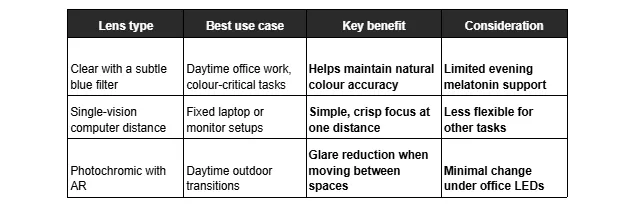
Lens choice is only half the story. Set your screen slightly below eye level, keep it an arm’s length away, and raise the ambient light to avoid stark contrast. Especially in Canadian winters, indoor air runs dry—so consider a humidifier and remember to blink. For broader viewing hygiene, fold in eye-strain prevention habits while you refine your lens pick.
Can screen-use glasses improve sleep and focus?
Short answer: yes—used in the right context. Daytime filters can clean up glare without shifting colours. Evening-weighted filters can trim alerting blue light, signalling to your brain that sleep is on the horizon. Pair them with consistent routines, and your body clock will thank you. Habits that amplify the benefits:
- Use stronger filtering after sunset if late screens are unavoidable.
- Dim overheads and add warm task lighting to reduce scatter.
- Match font size and contrast to your viewing distance.
- Nudge brightness down at night to avoid light spikes.
- Follow 20-20-20: every 20 minutes, look 20 feet away for 20 seconds.
As a rule of thumb, what do blue-light glasses do for sleep? They lower evening blue exposure and curb late-night glare so melatonin can rise. During the day, lighter filters keep colours true. If you rely on colour accuracy for creative work, keep a clear, low-filter pair for daytime, then swap to your evening pair after hours.
Final thoughts: Choosing the right glasses for screen use
You don’t need a big life overhaul to feel better at screens. Start by setting a comfortable viewing distance, boosting ambient light, and picking lenses that match your schedule. Then stack habits that stick: brief breaks, gentle blinks, and warmer light after dark. That steady approach keeps strain down and focus up—great value without the drama.
If you’d like a friendly nudge, explore frame colours and lens options, then book a fitting when you’re ready. For added guidance, check out Dresden Vision’s vision-care tips to fine-tune your setup for the week ahead.