

- VOLUME 72: Which Glasses for Screen Use Are Best for Work and Home?
VOLUME 72: Which Glasses for Screen Use Are Best for Work and Home?
Tuesday, 2 December 2025
In New Zealand, the easiest win is a two-step setup: clear AR lenses with a gentle blue filter for daytime and a warmer pair for evening sessions. When screens run from dawn to dusk, dryness and fuzzy focus follow. The right computer eyewear keeps you sharp at the desk and relaxed on the sofa—protecting long-term comfort without fuss. If you lean towards computer lenses, you’re solving the same trio—blue light, glare, near-work strain—and the “right” choice shifts with your role, lighting, and eyes. This guide keeps it practical: when to wear blue-light glasses, what those filters actually do, and whether computer lenses are worth it. By the end, you’ll land on a combo that nails the brief and handles the hard slog.
Why do eyes feel tired on screens without supportive glasses?
Spending hours on laptops, phones, and TVs forces your visual system to maintain a near focus. That tightens the ciliary muscles and reduces how often you blink. Add reflections from overhead LEDs common in NZ workplaces, and you get headaches, gritty eyes, and attention drop-offs. The silver lining: you can fix a lot of this. Usual contributors include:
- Blinking less speeds up tear evaporation, which leads to dryness and fuzzy vision.
- Continuous close work can cause microspasms that feel like a dull, deep ache.
- Reflections and glare add visual clutter, so text shimmers and edges are harder to track.
- Awkward viewing distances and poor posture strain your neck and shoulders.
- Tiny fonts and washed-out contrast force your eyes to work overtime.
Blue light plays a role, but ergonomics and habits matter just as much. A light daytime filter can tame glare from mid-morning into the afternoon. After sunset, a stronger tint—or warmer software settings—can help you wind down. Before changing everything, think about how computer glasses address digital eye strain and how purpose-built eyewear works alongside better techniques to ease it.
How does blue light shape vision at work and at home?
In daylight, some blue light supports alertness; in the evening, heavy exposure can shift your body clock later. That’s when lines of text seem to crawl and focus slips. Typical knock-ons include:
- Night-time blue light can delay melatonin release, pushing bedtime back.
- Bright open-plan offices with punchy LEDs can elevate glare.
- Using a phone while the TV is on stacks multiple light sources, increasing visual “noise.”
- Shiny screens bounce room lighting back at you, boosting stray light to the retina.
- Poor brightness settings flatten contrast, so you end up squinting.
Because blue light scatters more readily than warmer tones, it can amplify glare and dull contrast on glossy displays. Understand how blue-light filters work, then compare your work and home setups to see what needs adjusting.
What if digital eye strain gets ignored?
Letting symptoms run unchecked can turn a busy week into a headache—literally. You might start avoiding dense reading, cranking text size, or reaching for pain relief. Warning signs include:
- Focus recovery slows, particularly after short breaks.
- Head and neck discomfort pile up when posture and vision are at odds.
- Dryness can trigger reflex tearing, making clarity come and go.
- Light sensitivity spikes, so open-plan lighting feels harsh.
- Bedtime drifts later, which dents alertness the next day.
Without changes, your visual system keeps grinding to stabilise focus in glare. You don’t have to put up with that. The right eyewear, smarter posture, and tuned display settings can make a noticeable difference—less fatigue across the day and more consistent comfort into the evening.
How do computer-specific glasses lower fatigue and support eye comfort?
Computer glasses don’t perform miracles—they simply lighten the load. A good anti-reflective coating, sensible blue-light filter, and accurate prescription work together for calmer, steadier vision. Key contributors:
- Anti-reflection coatings suppress stray reflections from screens and lighting.
- Blue-light filtration reduces scatter and can enhance perceived contrast.
- Correct posture eases the ciliary muscles during long spells of close work.
- Optional evening tints add comfort after dark without going overboard.
- A stable frame fit keeps optical centres aligned with your gaze.
Comparing options in New Zealand? Prioritise coating quality, comfort, and prescription precision before cranking up colour filters—especially when choosing the best glasses for computer screen use.
Which lens types tend to suit screen-heavy days?
Different roles and rooms call for different optics. A creative moving between several monitors needs crisp, quick mid-range focus. A developer coding after sundown might appreciate stronger evening filtering. If you wear distance correction, a mild near boost can keep your posture relaxed. Pick carefully to avoid over-filtering, which can dull colour and contrast.
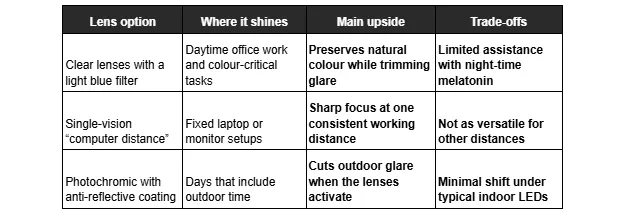
Lenses are only half the equation. Set your screen a touch below eye level, keep it roughly an arm’s length away, and lift ambient light so contrast isn’t harsh—simple steps in eye strain prevention that pay off during NZ’s shorter winter days.
Can screen-use eyewear help with sleep and concentration?
In the right context, yes. Lighter daytime filters tidy up glare without skewing colours too much. After dark, stronger filtering reduces stimulating blue light, helping melatonin rise and signalling to your brain that sleep is near. Pair that with steady habits, and your circadian rhythm will settle. Habits that make the difference:
- Use a higher-filter option after sunset if you must stay on screens.
- Dim ceiling lights and add warm task lighting to reduce scatter.
- Scale font size and contrast to match your viewing distance.
- Drop screen brightness at night to avoid bright spikes.
- Follow 20-20-20: every 20 minutes, look 6 metres away for 20 seconds.
Final thoughts: Choosing the right glasses for screen use
You don’t need a massive overhaul to feel better on screens. Maintain a comfortable viewing distance, lift ambient light, and use lenses suited to your schedule. Take regular breaks, blink often, and switch to warm light after dark. Add a few practical tips from Dresden Vision, and you’ll stay comfortable and focused with minimal fuss.